Real equipment and ports
Use vendor models with accurate port counts, layouts, labels, media types, PoE, and disabled-port states.
| Vendor | SKU | Name | Cat | WAN | LAN | SFP | PoE | Cost $ | Lead d | Updated |
|---|
Design with real Meraki, UniFi, Fortinet, accessories, and endpoints. Map every cable to a visible numbered port, build clean racks, and turn the same diagram into a priced bill of materials.
Sign in or create your free customer workspace.
SafeLink keeps the physical network, port-level connections, equipment pricing, lead times, attachments, and customer access together instead of scattering them across drawing and quoting tools.
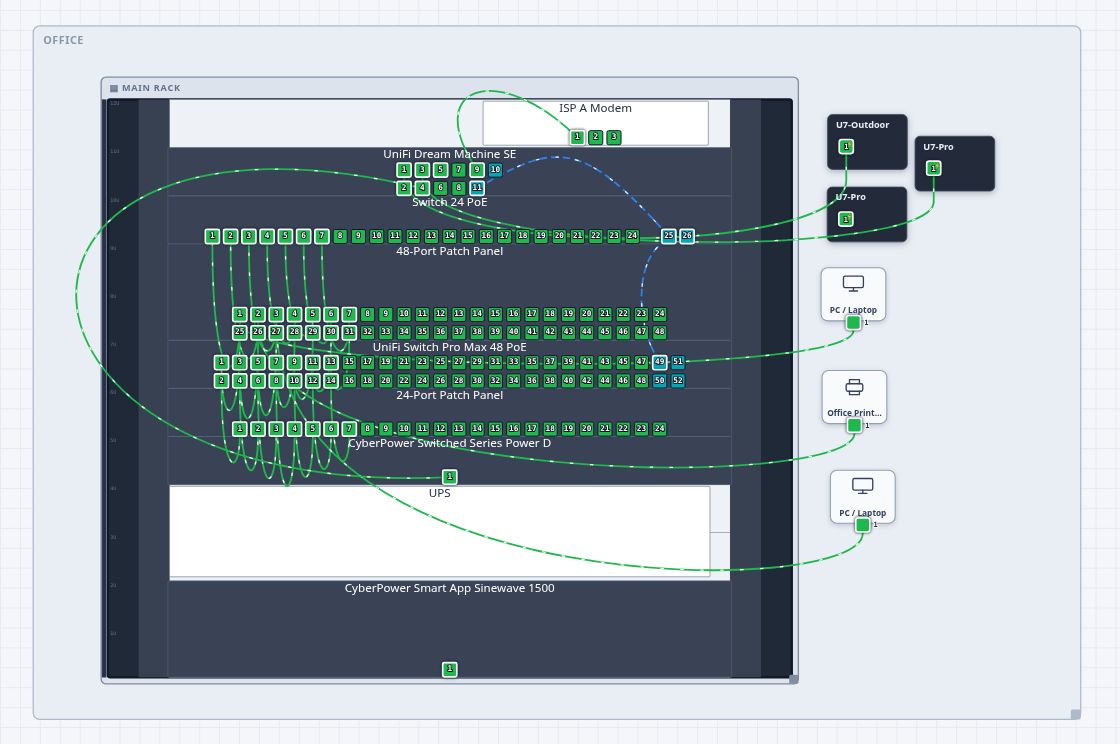

Use vendor models with accurate port counts, layouts, labels, media types, PoE, and disabled-port states.
Place hardware and accessories in racks, preserve U positions, edit rack items, and connect cables directly to visible ports.
Add your unit cost and lead time, then export a BOM with quantities, extensions, totals, and estimated arrival.
Keep every client’s sites, diagrams, and attachments in the correct workspace and custom subdomain.
Invite owners, administrators, editors, and viewers so each person sees and changes only what their role allows.
Securely connect Meraki, UniFi, and FortiManager, import discovered hardware and relationships, define addressing and VLANs, and publish reviewed configurations where the vendor API supports them.
Catch duplicate IPs, overlapping subnets, undefined VLANs, incompatible cable media, PoE overruns, missing uplinks, loops, and rack conflicts before work begins.
Restore revisions, compare the live dashboard with the saved plan, generate customer proposals, run installation checklists, and reuse complete network templates.
Submit exact diagram revisions for approval, assign reviewers, request changes, discuss designs, mention teammates, resolve comments, and retain a project activity trail.
Convert diagram BOM items into purchasing records with quantities, costs, purchase orders, tracking numbers, delivery dates, and received or installed status.
Apply customer-specific logos and colors, generate branded proposals, create secure read-only API keys, and send signed project webhooks to external systems.
Export diagram files, standalone views, BOM CSVs, and project attachments for handoff and field use.
Place actual hardware, endpoints, buildings, racks, and cables. Keep every port number visible.
Use quantities, custom costs, and lead times from the same equipment already present in the diagram.
Create client sites and role-based users, attach project files, and export clean deliverables.
Every plan uses the same planner. Paid plans unlock ongoing editing and larger customer operations.
Describe your needs and provide your contact information. SafeLink will reply with scoped pricing.
The multi-vendor catalog includes Meraki, UniFi/Ubiquiti, Fortinet, validated NETGEAR business products, network accessories, rack hardware, power equipment, and common endpoints.
Your saved diagrams remain available to view and download. Creating more diagrams or editing saved diagrams is unlocked by a paid plan.
Yes. Workspace owners can invite administrators, editors, and viewers. Viewer accounts cannot change the customer’s network documentation.
You can use custom devices immediately. SafeLink can also quote precise additions for models or vendors that are not yet in the validated catalog.
Yes. Equipment cost and lead-time fields feed the exported bill of materials so your diagram can support a working quote.
Yes. SafeLink stores reusable vendor connections securely, imports available inventory and topology, and publishes reviewed VLAN, addressing, VPN, template, and port changes supported by the selected vendor API. Vendor-specific guidance is built into every new connection.
Small MSPs, network consultants, internal infrastructure teams, low-voltage integrators, and anyone responsible for both network design and project cost.
Start free, save three diagrams, and see whether a port-aware planner makes your next design and quote faster.
The seven-day payment grace period has ended. All diagrams, sites, users, and attachments are retained, but this workspace is unavailable until payment is completed.